All Blogs/Network
19 Aug 2026
5 min read

How Data Actually Travels: A Packet's Journey

How Data Actually Travels: A Packet's Journey

By: Martian Corporation

Introduction

“You type a URL. Seconds later, a webpage appears. What happened in between?”

It feels almost instantaneous, but loading a website triggers a surprisingly long chain of events. Your browser needs to find the server, establish a connection, send a request, travel across multiple networks, receive a response, and finally turn that response into the page you see.

All of the concepts we've covered so far — networks, packets, protocols, layers, TCP/IP, and routing — come together in this single journey. Understanding what happens when you open a website is one of the easiest ways to see networking as one connected system instead of a collection of separate topics.

Step 1: You Enter a URL

“Before your browser can request a website, it needs to know where that website lives.”

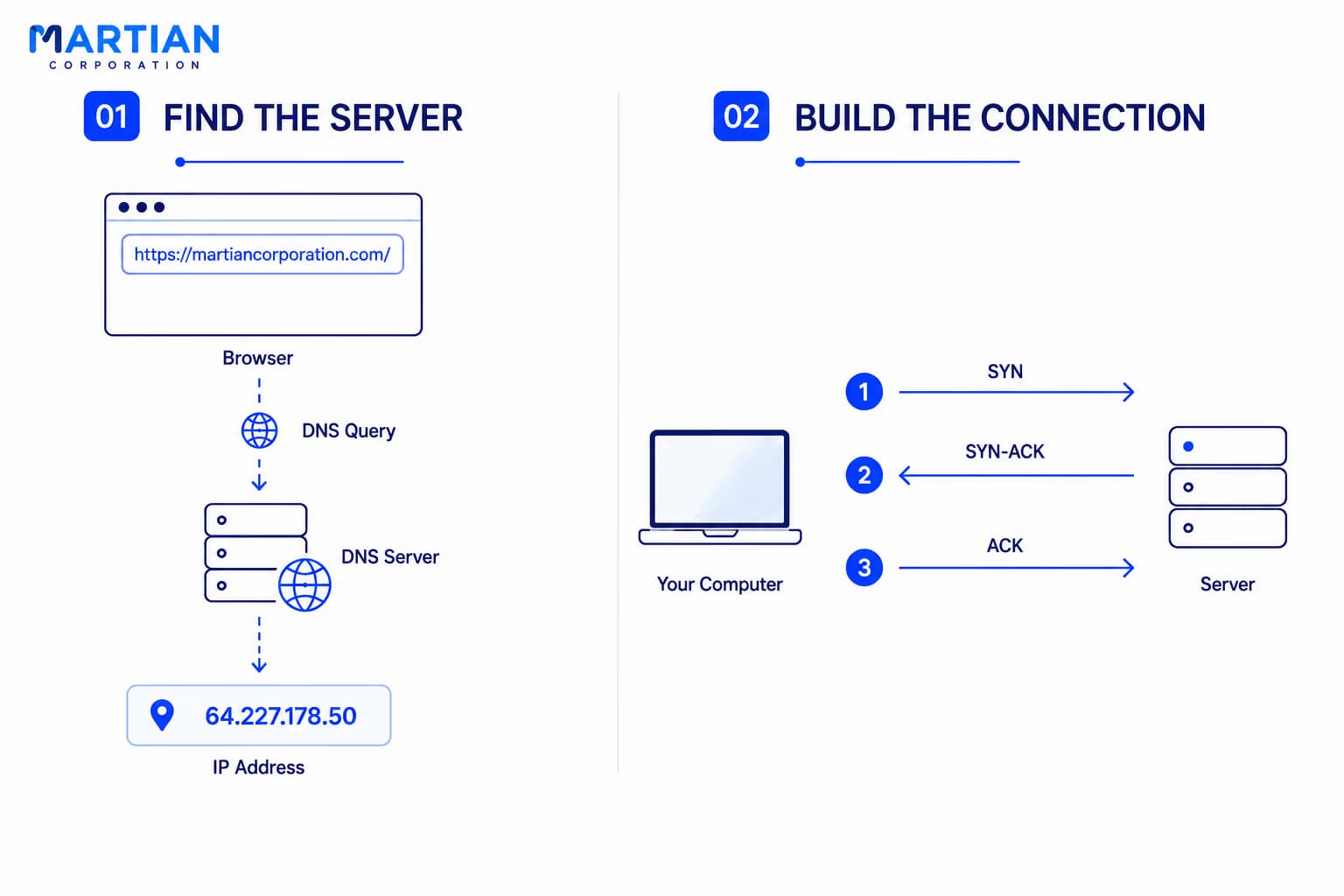
Suppose you type example.com into your browser. Your computer can't send a network request to a domain name directly. It first needs an IP address.

That's where DNS, or the Domain Name System, comes in. Your browser or operating system asks a DNS server to translate the domain name into an IP address. Once it receives the address, your computer knows which server it needs to contact.

It's similar to looking up someone's name in your contacts before making a phone call. You know who you want to reach, but you still need their actual number.

Step 2: TCP Builds the Connection

“Knowing the destination isn't enough. The two devices still need to agree to communicate.”

If the connection uses TCP, your computer first performs a TCP three-way handshake with the server. It sends a SYN packet, the server responds with SYN-ACK, and your computer sends back an ACK.

This establishes the connection and allows both sides to begin communicating reliably.

Only after this handshake does the actual application data begin moving. The browser can now send its request to the server, usually using HTTP or HTTPS.
Step 1 &2

Step 3: The Packet Starts Its Journey

“Your request doesn't travel directly from your laptop to the server.”

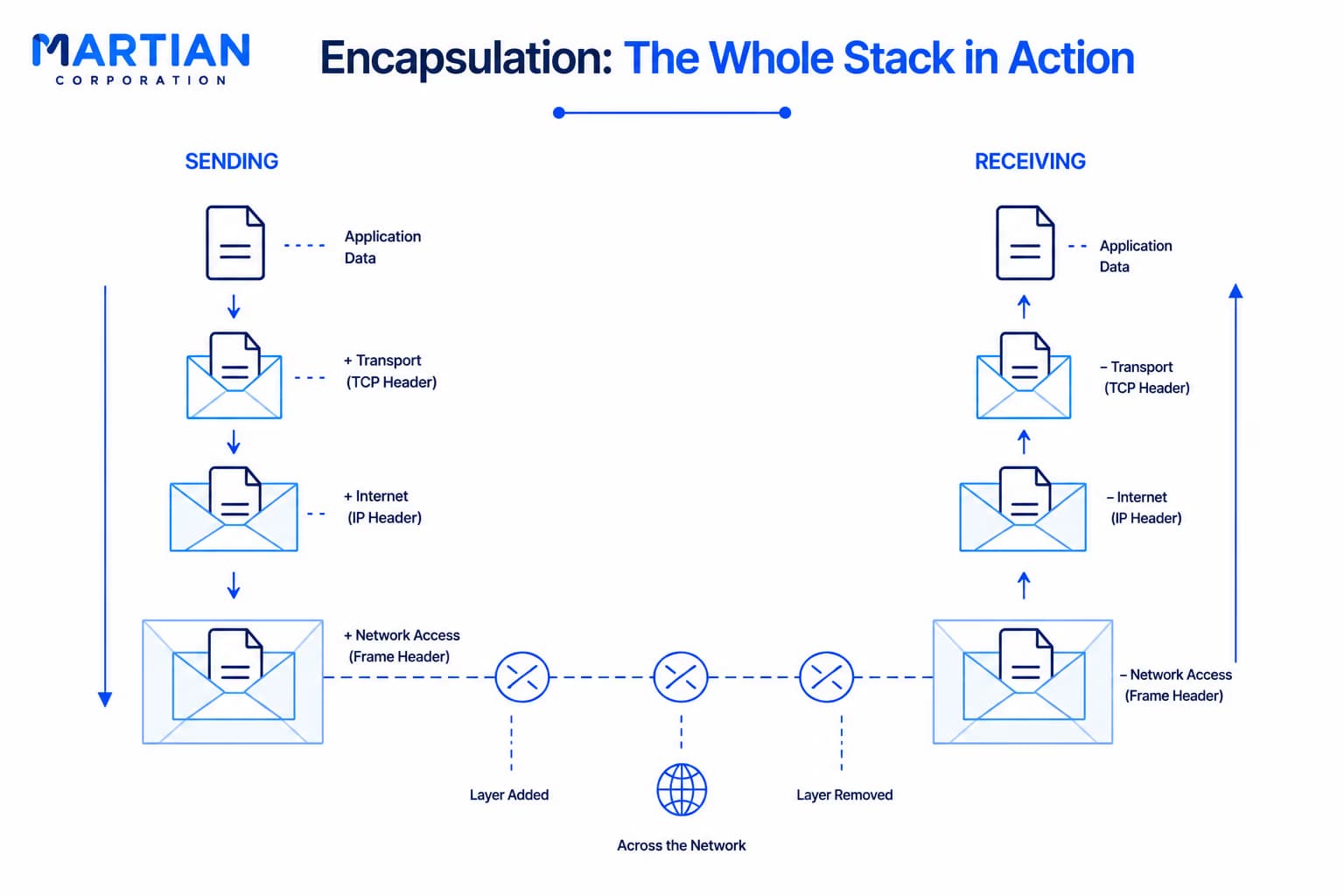
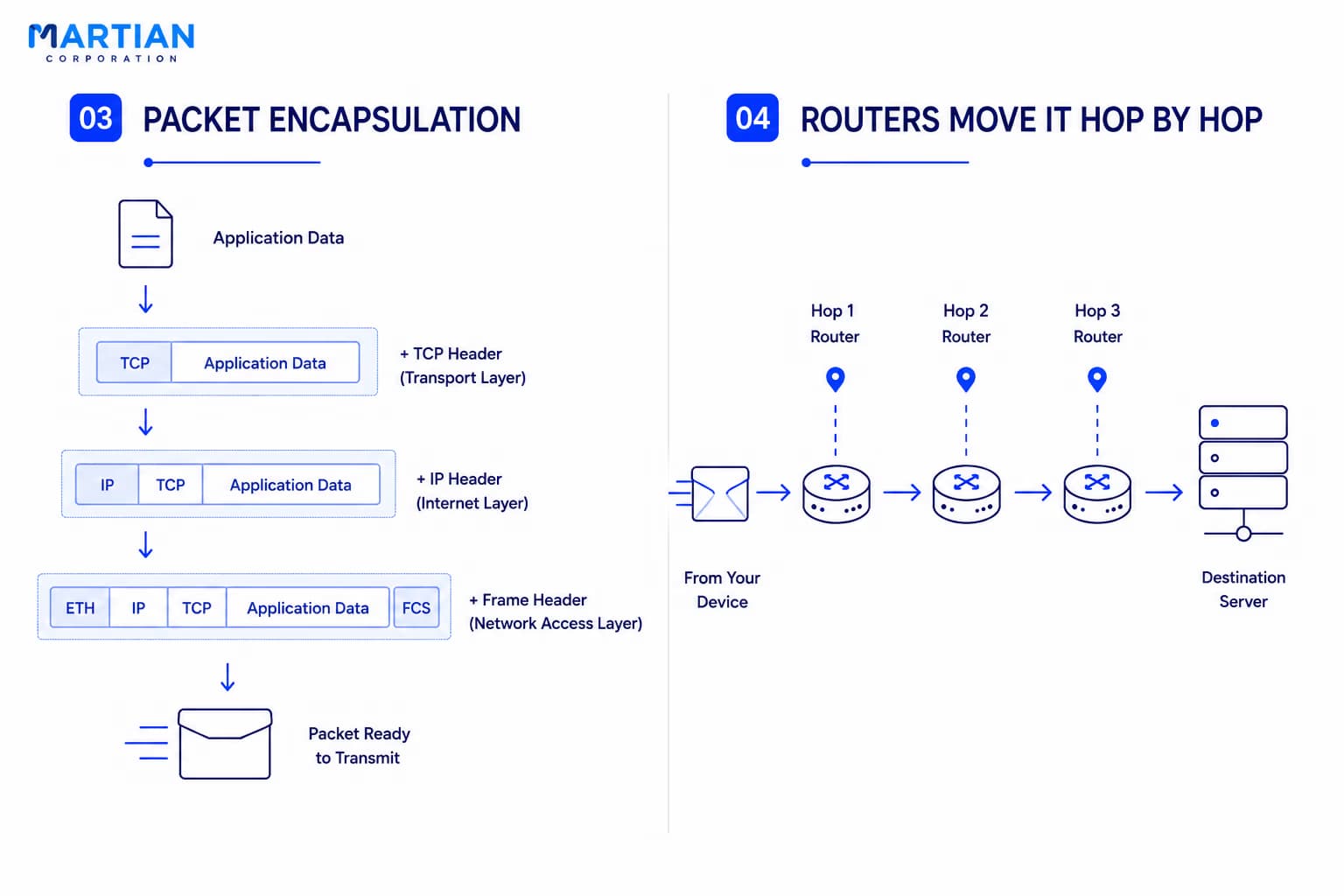
Once the request is ready, it is broken down and encapsulated as it moves through the networking stack. The application creates the data, TCP adds transport information, IP adds addressing information, and the network access layer prepares it for transmission over Wi-Fi or Ethernet.

Your device then sends the packet to the local network, usually through your router.

From there, the packet begins its journey across the Internet.

Step 4: Routers Move It Hop by Hop

“The Internet doesn't know the entire journey at once. It only knows the next step.”

Your packet may pass through several routers before reaching the destination server. Each router examines the packet's destination IP address and uses its routing table to decide where to send it next.

One router forwards it to another, which forwards it again, and the process continues until the packet reaches the network containing the destination server.

The exact path isn't necessarily fixed. Different packets can sometimes take different routes depending on network conditions and routing decisions.

This is why the Internet is better understood as a network of networks, rather than one single path connecting every device.

Step 3 &4

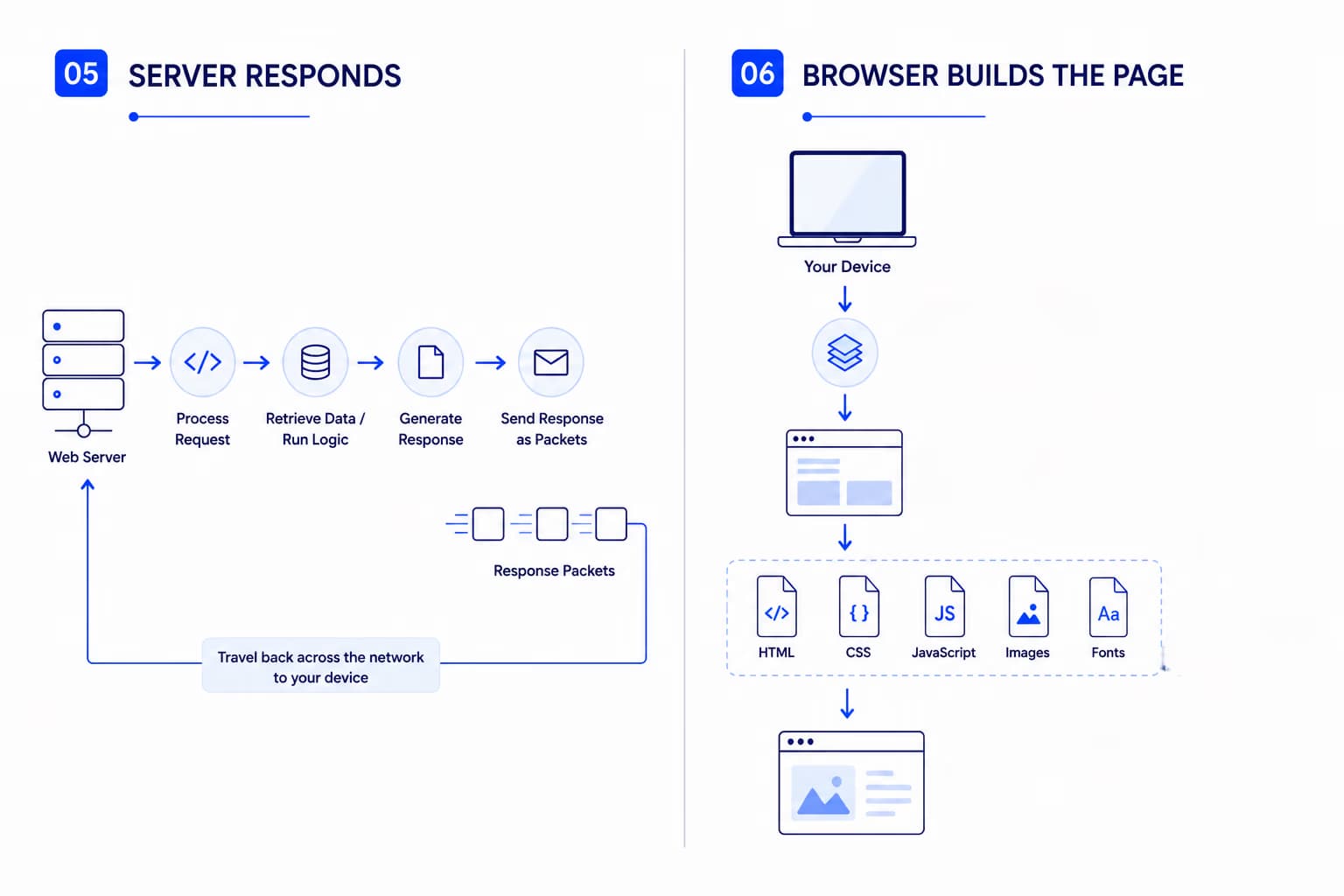
Step 5: The Server Responds

“The journey doesn't end when your request arrives. That's when the server starts its part.”

When the packet reaches the server, the encapsulated information is processed through the networking layers. The server's application receives the HTTP request and determines what needs to be returned.

It might retrieve information from a database, run application logic, fetch files, or simply return a static webpage.

The server then sends a response back through the network.

That response becomes packets again, travels across multiple routers, reaches your network, and eventually arrives back at your device.

Step 6: Your Browser Builds the Page

“The server doesn't send you a webpage. It sends data your browser knows how to turn into one.”

Once the response reaches your computer, the networking stack processes it and delivers the data to the browser.

The browser reads the HTML, discovers additional resources such as CSS, JavaScript, images, and fonts, and may make more network requests to retrieve them.

Those requests follow the same basic journey again: DNS, connection, packets, routing, server response, and processing.

Eventually, the browser has enough information to construct and render the page you see on your screen.

What looked like one simple action — opening a website — was actually a series of network conversations happening in fractions of a second.

Step 5 & 6

Encapsulation: The Whole Stack in Action

“Every layer adds something, then the receiving device takes it apart again.”

This entire journey is where the TCP/IP Model finally becomes practical.

The application creates the data. The transport layer manages the connection. The Internet layer handles addressing and routing. The network access layer moves the data across the local network.

As the data moves down the stack, each layer adds information needed for communication. At the destination, those layers are processed in reverse and the original data is reconstructed.

That's encapsulation and decapsulation in action.

The models aren't abstract diagrams anymore. They're describing what actually happens to the data sitting inside every request you send.

Encapsulation

Conclusion

“Every website you open is a networking lesson happening in real time.”

From the moment you enter a URL to the moment a webpage appears, almost every major networking concept we've discussed is involved. DNS finds the destination, TCP establishes communication, packets carry the data, routers move them hop by hop, and the server sends a response that your browser eventually turns into something you can see and interact with.

The OSI Model gives us a way to understand the responsibilities involved. The TCP/IP Model shows how those responsibilities fit into the practical Internet stack. And the packet's journey connects both ideas to something you do every day.

NewsLetter

Stay ahead in the world of technology

Get curated technology trends, expert analysis, and product updates delivered straight to your inbox — no noise, just signal.

Enter your email address

By subscribing you agree to our Terms and Conditions and Privacy Policy

More Blogs

TCP/IP Model: The One the Internet Actually UsesNetwork
14 Aug 2026
4 min read

TCP/IP Model: The One the Internet Actually Uses

The Internet may seem seamless, but behind every website, message, and online service is a powerful framework that makes global communication possible. The TCP/IP model provides the foundation for how devices connect, exchange data, and communicate across different networks. This article explores the four layers of the TCP/IP model, their individual roles, and how they work together to deliver information reliably from one device to another. Understanding TCP/IP offers a clearer view of the technology that quietly powers the modern Internet and our increasingly connected digital world.

Read more
featured imageNetwork
7 Aug 2026
3 min read

Network Topologies & Architecture: How the Shape of a Network Defines Its Strength

Every network begins with a design. The way devices are connected—known as network topology—determines how efficiently data flows, how resilient the network is to failures, and how easily it can scale as demands grow. In this article, we'll explore the most common network topologies—Bus, Star, Ring, Mesh, and Hybrid—understand the difference between physical and logical topology, and discover how modern enterprises use three-tier campus networks and spine-leaf architecture to build fast, reliable, and scalable infrastructure. Whether you're learning Computer Networks, preparing for CCNA, or exploring network architecture and system design, this guide connects the fundamentals with real-world implementations.

Read more
Types of Networks: LAN, WAN, MAN, PAN & BeyondNetwork
5 Aug 2026
3 min read

Types of Networks: LAN, WAN, MAN, PAN & Beyond

Computer networks come in many forms, each designed to meet specific communication and connectivity needs. From Personal Area Networks (PAN) and Local Area Networks (LAN) to Metropolitan Area Networks (MAN), Wide Area Networks (WAN), and beyond, every network type plays a unique role in enabling seamless data exchange. This article explores the characteristics, applications, advantages, and real-world use cases of different network types, providing a clear understanding of how they collectively power our connected digital ecosystem.

Read more