By clicking “Accept All Cookies”, you agree to the storing of cookies on your device to enhance site navigation, analyze site usage, and assist in our marketing efforts.*

All Blogs/Network
26 Aug 2026
5 min read

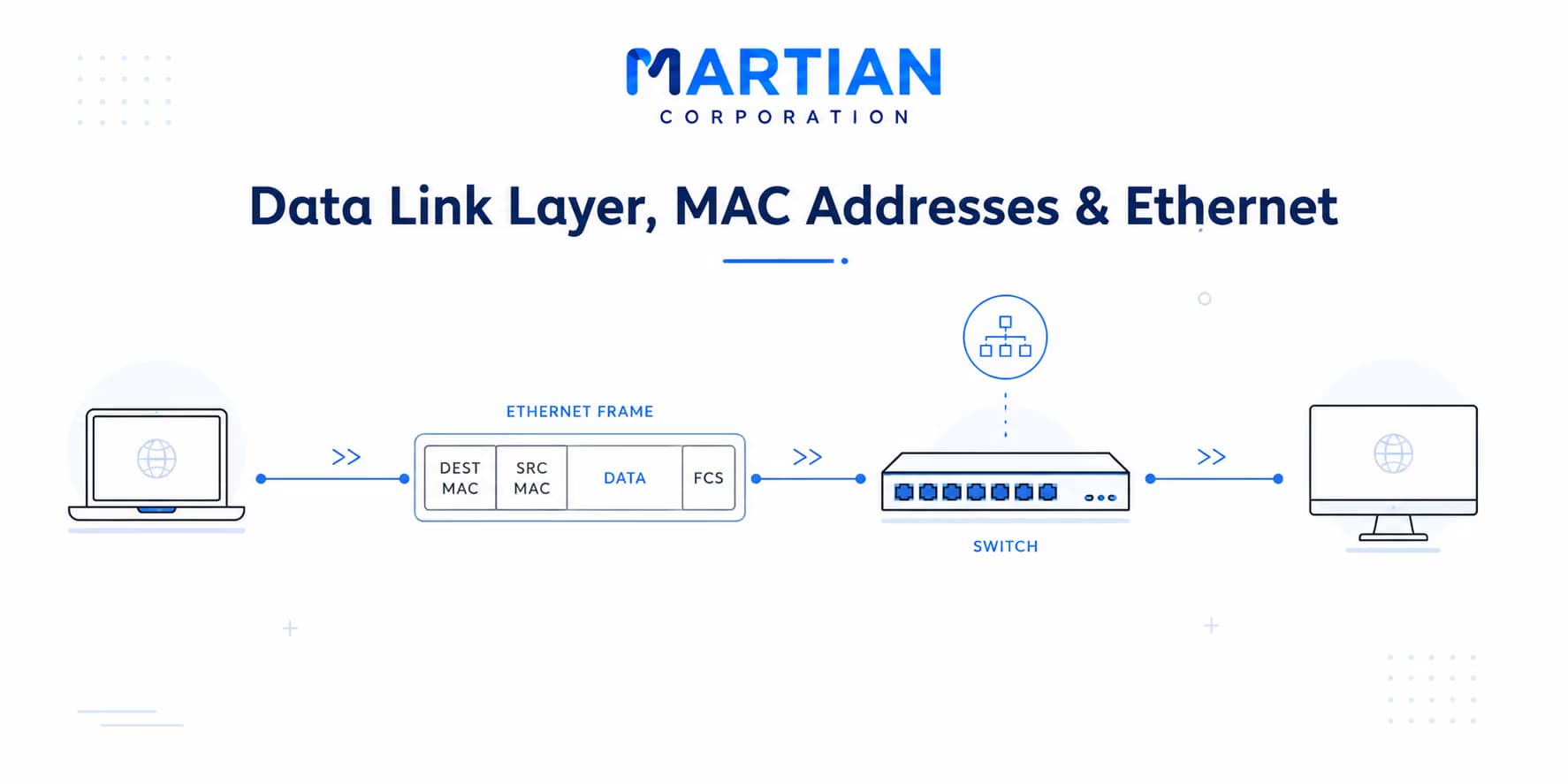
Data Link Layer, MAC Addresses & Ethernet

Data Link Layer, MAC Addresses & Ethernet

By: Martian Corporation

Introduction

“The Physical Layer moves signals. The Data Link Layer turns those signals into local communication.”

In the previous article, we saw how bits become physical signals and travel through copper, fiber, or wireless media. But a signal reaching a device is only the beginning. A network still needs to organize those bits, identify devices, detect errors, and decide where the data should go.

This is where the Data Link Layer becomes important. It sits directly above the Physical Layer and focuses on communication across the local network — using frames, MAC addresses, Ethernet, switches, and error detection.

Frames Give Data a Structure

“Bits become useful when the network knows which bits belong to the same transmission.”

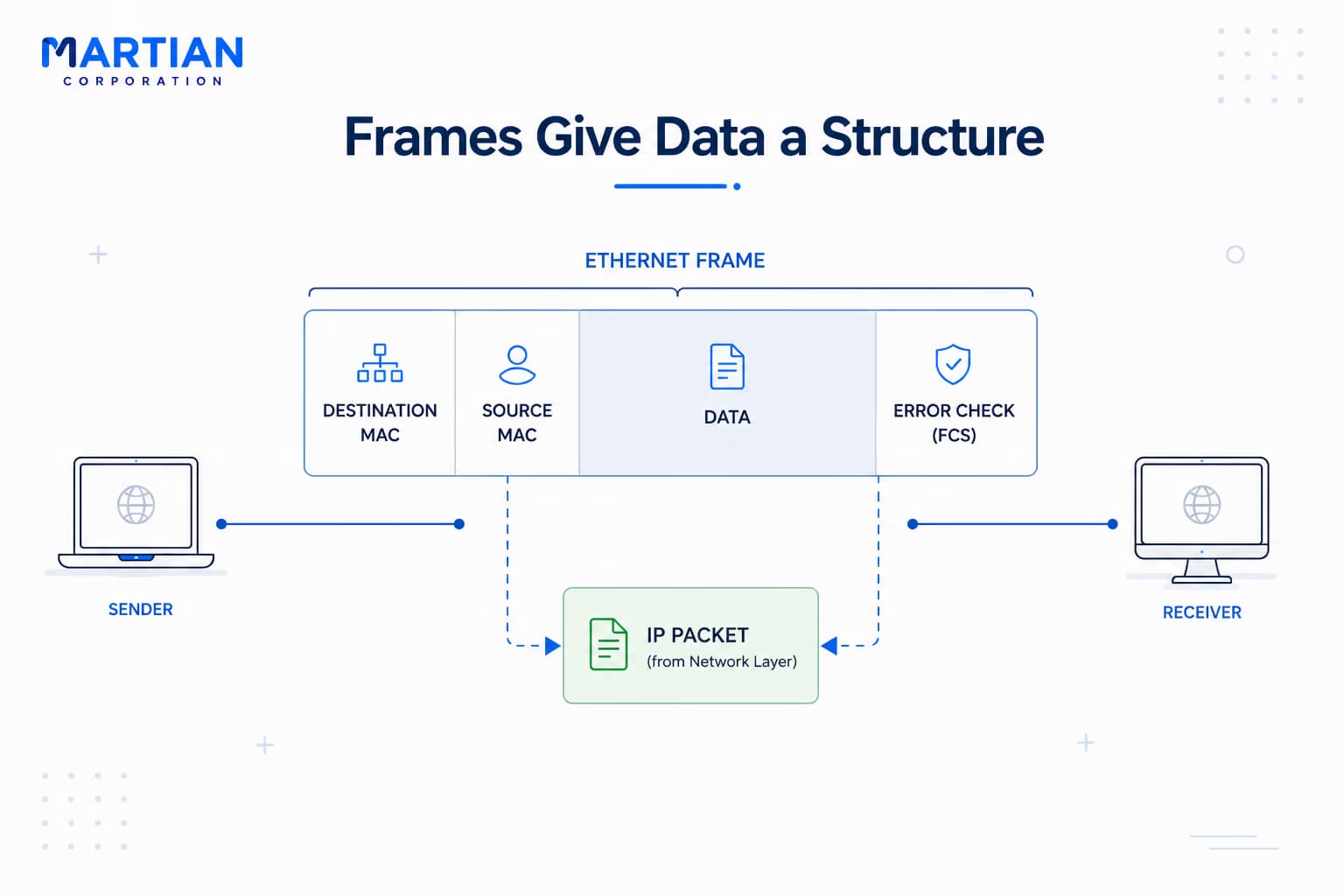
The Physical Layer deals with a stream of signals. The Data Link Layer gives that stream structure by organizing data into units called frames.

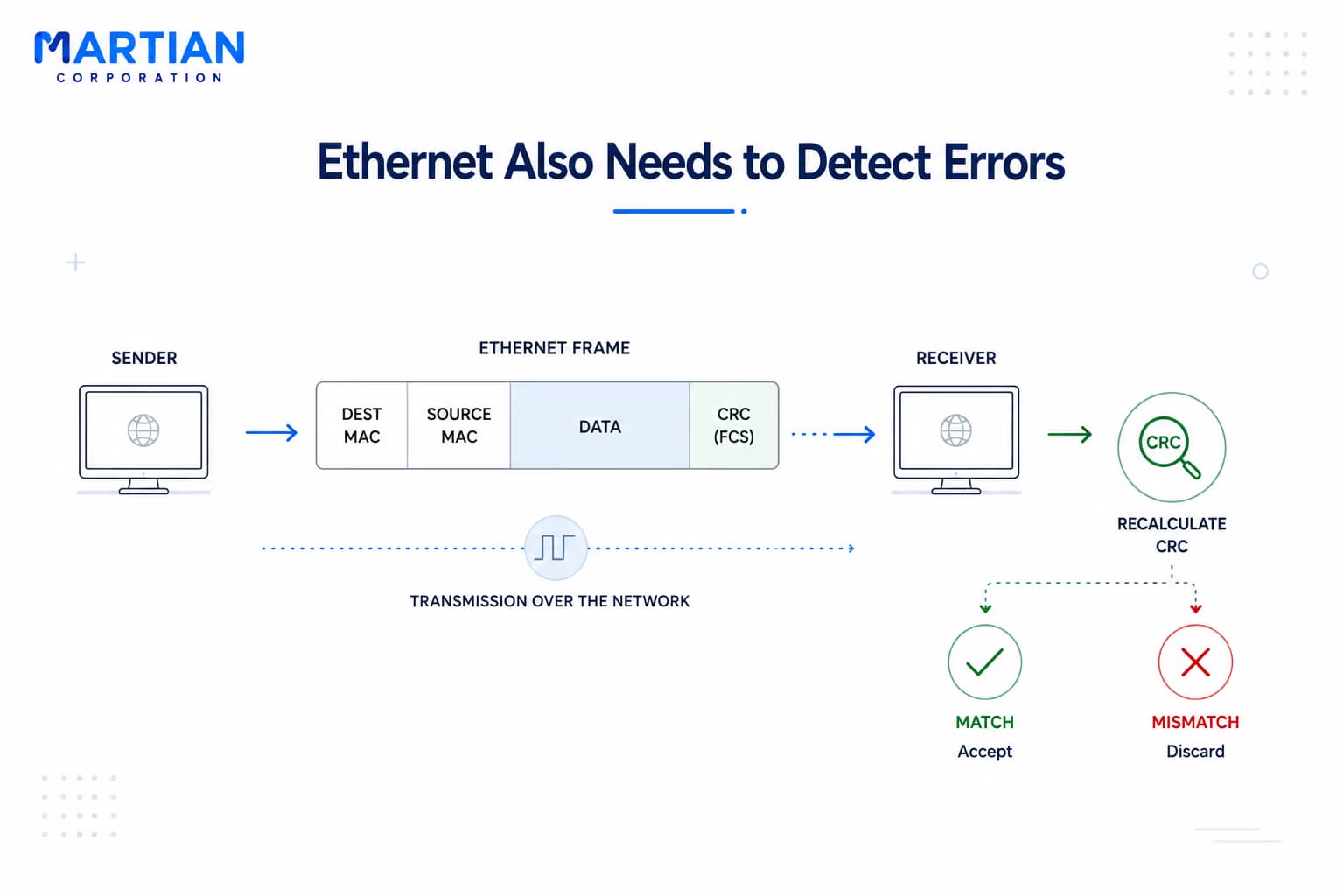
An Ethernet frame contains information such as the destination MAC address, source MAC address, the data being carried, and an error-checking value. A simplified view is: Destination MAC → Source MAC → Data → Error Check.

Think of a frame like a local delivery package. The physical network provides the road, while the package contains the information needed to handle that particular delivery.

The layer above may provide an IP packet, but the Data Link Layer wraps that packet inside a frame so it can move across the local network. At the receiving end, the device examines the frame, removes the Data Link information, and passes the packet upward.

This process connects the logical world of IP packets to the physical world of signals.
Frames Give Data a Structure

MAC Addresses Give Devices a Local Identity

“IP helps find the network; MAC helps deliver the frame locally.”

If frames provide structure, they also need a way to identify their sender and destination. This is where the Media Access Control (MAC) address comes in.

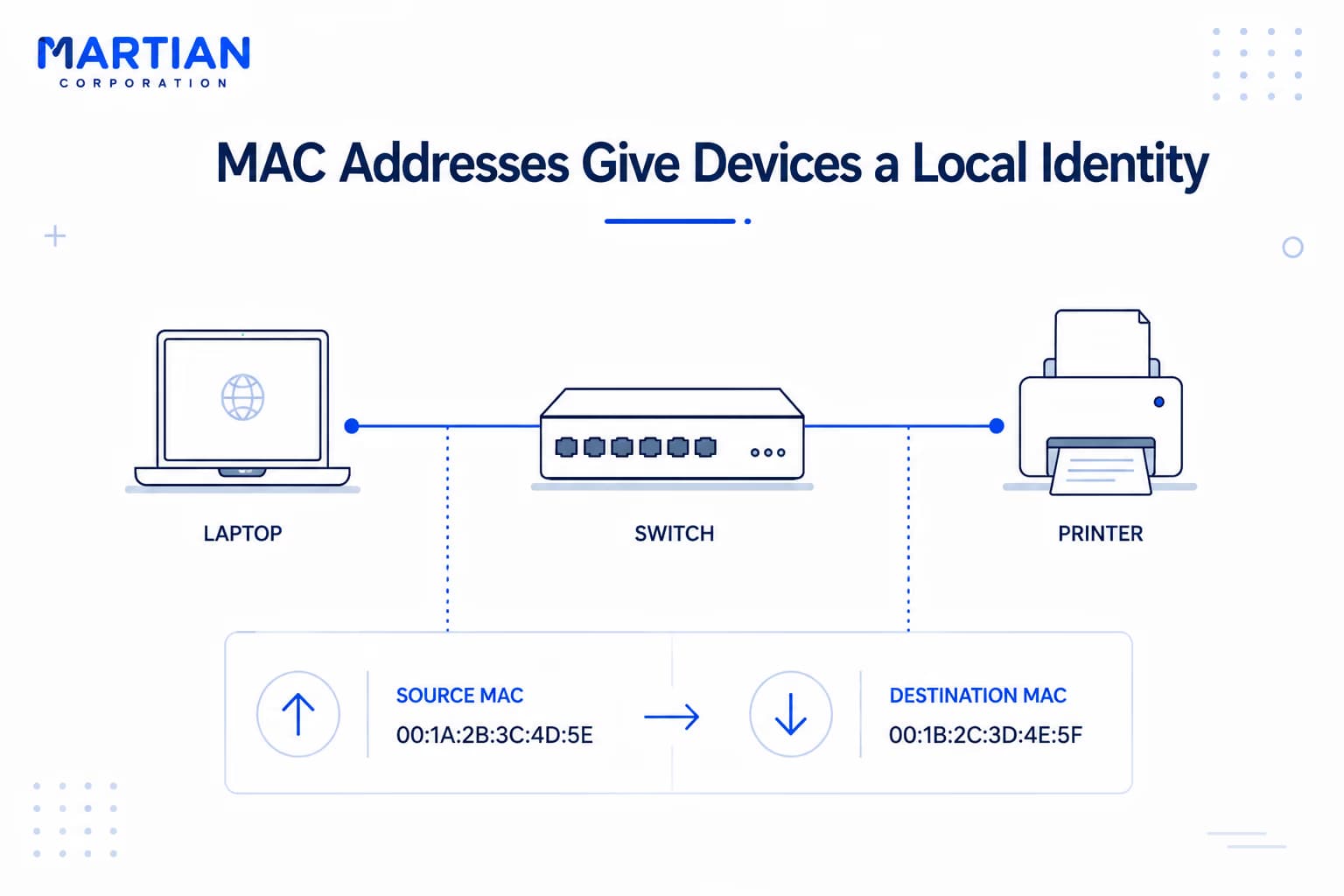
A MAC address identifies a network interface at the Data Link Layer. It is commonly represented using hexadecimal notation, such as 00:1A:2B:3C:4D:5E. When a device sends an Ethernet frame across a local network, the frame contains both a source MAC address and a destination MAC address. For example: Laptop → Switch → Printer.

This is different from an IP address. An IP address operates at the Network Layer and helps devices communicate across different networks. A MAC address is concerned with delivery across the local network link.

A useful way to remember the distinction is:  IP asks which network the data should reach; MAC identifies the local interface that should receive the frame.

As a packet travels beyond the local network, it can cross many networks. At each local link, however, it is carried inside a frame with the appropriate Data Link Layer addressing. The IP packet continues its larger journey while the frame around it can change.

MAC Addresses Give Devices a Local Identity

Ethernet & Switches Make Local Networks Practical

“A network becomes efficient when devices know where to send frames.”

One of the most widely used technologies at the Data Link Layer is  Ethernet . It defines common rules for communication across local wired networks, including how frames are structured and how devices communicate over Ethernet links.

This standardization allows equipment from different manufacturers to work together using the same fundamental rules.

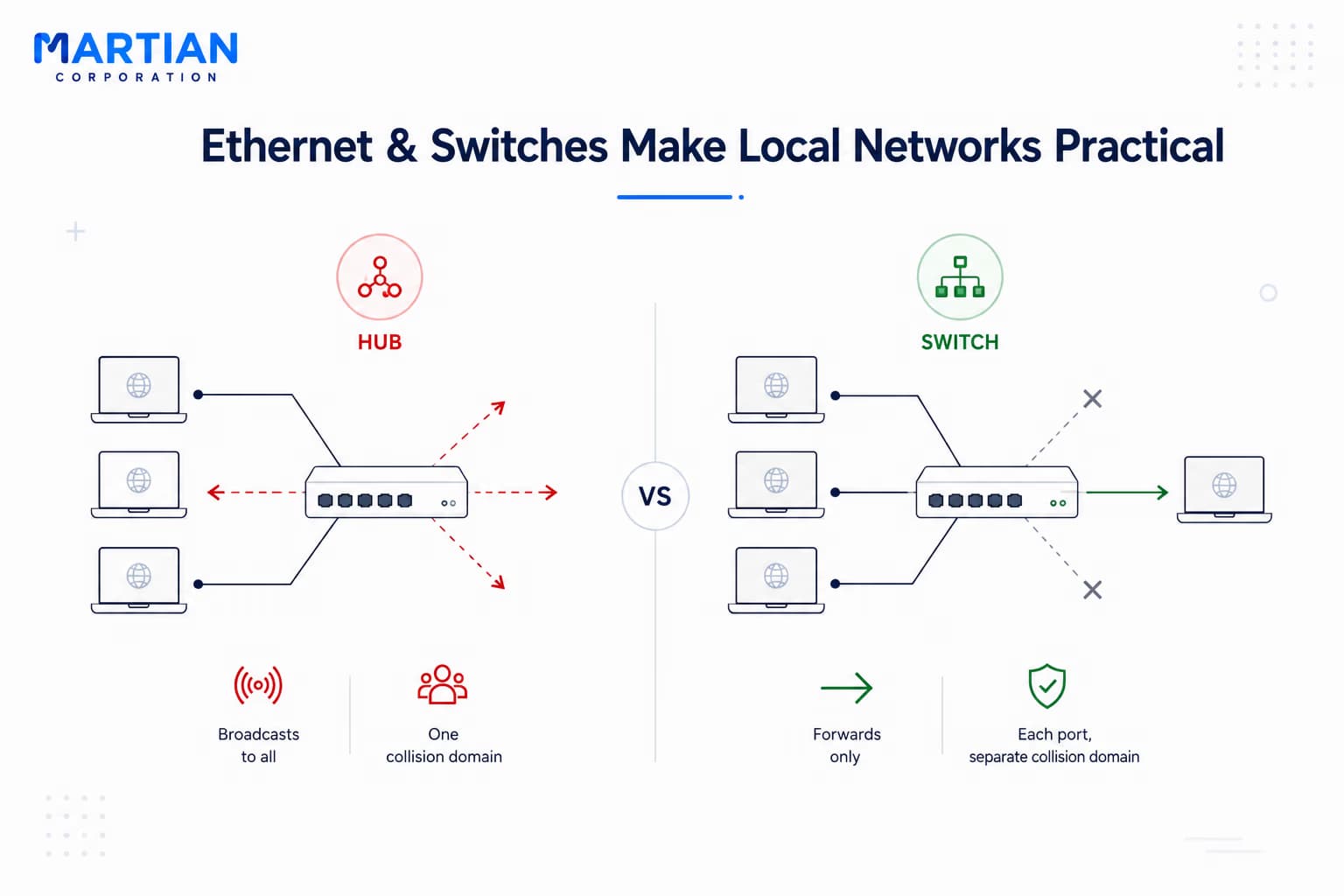
Now consider how devices are connected. An old-style  hub  does not make intelligent forwarding decisions. When it receives a signal, it repeats that signal to its other ports, meaning connected devices share the same communication environment.

This creates a shared  collision domain . If multiple devices transmit simultaneously on a shared medium, their signals can interfere with one another.

A  switch  changed this model. It learns which MAC addresses are associated with which ports. When a frame arrives, it examines the destination MAC address and uses its MAC address table to decide where the frame should be forwarded.

For example:  Computer A → Switch → Computer B . If the switch knows where Computer B is connected, it can forward the frame toward that port instead of sending it everywhere.

Modern switched Ethernet is therefore much more efficient than shared-medium networks. Each switch port can represent a separate  collision domain , while modern full-duplex Ethernet normally eliminates collisions on those links.

But switches do not automatically separate  broadcast domains . A broadcast frame can still be forwarded to multiple ports, meaning devices on the same Layer 2 network can remain part of the same broadcast domain.

Ethernet & Switches Make Local Networks Practical

Ethernet Also Needs to Detect Errors

“Fast communication is useful only when the receiver can recognize corrupted data.”

The Physical Layer deals with real signals moving through real environments. Noise, interference, damaged cables, and other physical conditions can cause transmitted data to become corrupted.

The Data Link Layer therefore needs a way to detect when a frame did not arrive correctly. Ethernet uses  Cyclic Redundancy Check (CRC)  for this purpose.

When the sender prepares a frame, it calculates a value based on the frame's contents and includes that value with the transmission. When the receiver gets the frame, it performs the calculation again and compares the result.

If the values do not match, the receiver knows that the frame was likely corrupted during transmission.

CRC is an  error-detection mechanism , not an error-repair mechanism. It does not reconstruct damaged data. Instead, it helps the receiver recognize the problem and discard the corrupted frame, while appropriate higher-level mechanisms can handle recovery.

This is another example of why networking is divided into layers. The Physical Layer carries the signal. The Data Link Layer organizes it into frames and checks the frame for errors. The Network Layer can then focus on moving packets between networks.

Ethernet Also Needs to Detect Errors

Conclusion

“The Data Link Layer turns a physical connection into organized local communication.”

Frames give structure to data. MAC addresses provide local identification. Ethernet establishes common communication rules, while switches make forwarding more efficient by learning where devices are connected. CRC helps detect corrupted frames.

Together, these mechanisms make the local network work. The bigger picture is important too: when a packet travels across the Internet, it moves through multiple networks and routers, but at every local link it still needs a Data Link Layer mechanism to carry it forward.

The  frame belongs to the local journey; the packet belongs to the larger journey . Understanding that distinction connects the Data Link Layer with everything we have explored so far — from physical signals and network models to IP addressing and packet delivery.

And once the frame has done its job locally, the next question naturally becomes bigger:  how does the Network Layer take that packet from one network and route it toward another?

NewsLetter

Stay ahead in the world of technology

Get curated technology trends, expert analysis, and product updates delivered straight to your inbox — no noise, just signal.

Enter your email address

By subscribing you agree to our Terms and Conditions and Privacy Policy

More Blogs

The Physical Layer: Cables, Signals & MediaNetwork
21 Aug 2026
5 min read

The Physical Layer: Cables, Signals & Media

The Physical Layer: Cables, Signals & Media Every network begins with something physical — electrical signals through copper, pulses of light through fiber, or radio waves through the air. In this article, we take a closer look at the Physical Layer of the OSI Model and understand how data actually travels between devices. We’ll explore copper cables, twisted-pair wiring, fiber optic communication, wireless networks, bandwidth, throughput, latency, signal encoding, connectors, and networking standards — the building blocks that make modern computer networks possible. Because before packets can be routed, addressed, or delivered, they first need a physical medium to travel through.

Read more
How Data Actually Travels: A Packet's JourneyNetwork
19 Aug 2026
5 min read

How Data Actually Travels: A Packet's Journey

Every time we send a message, open a website, stream a video, or download a file, enormous amounts of data travel across complex networks in the form of tiny packets. But how does this data actually reach its destination? This article explores the journey of a data packet—from being broken down at the source to being addressed, routed, transmitted, and reassembled at its destination. Understanding this process provides a clearer picture of how the Internet moves information across interconnected networks, often in just milliseconds.

Read more
TCP/IP Model: The One the Internet Actually UsesNetwork
14 Aug 2026
4 min read

TCP/IP Model: The One the Internet Actually Uses

The Internet may seem seamless, but behind every website, message, and online service is a powerful framework that makes global communication possible. The TCP/IP model provides the foundation for how devices connect, exchange data, and communicate across different networks. This article explores the four layers of the TCP/IP model, their individual roles, and how they work together to deliver information reliably from one device to another. Understanding TCP/IP offers a clearer view of the technology that quietly powers the modern Internet and our increasingly connected digital world.

Read more